Overview¤
msl-network uses concurrency and asynchronous programming to transfer messages across a network and it is composed of a Broker, Clients and Services with a Link established between a Client and a Service.
-
Broker
- Central node in the network.
- Clients and Services connect to it.
- Routes messages to the appropriate recipient (Client or Service).
-
Client
- Connects to a Broker.
- Creates a Link with a Service (a single Client can create multiple links).
- Sends a request to the Service and receives the reply.
- Subscribes to messages that are published by the Service.
-
Service
- Connects to a Broker.
- Processes a request from a Client and sends the reply.
- Publishes messages to all subscribed Clients.
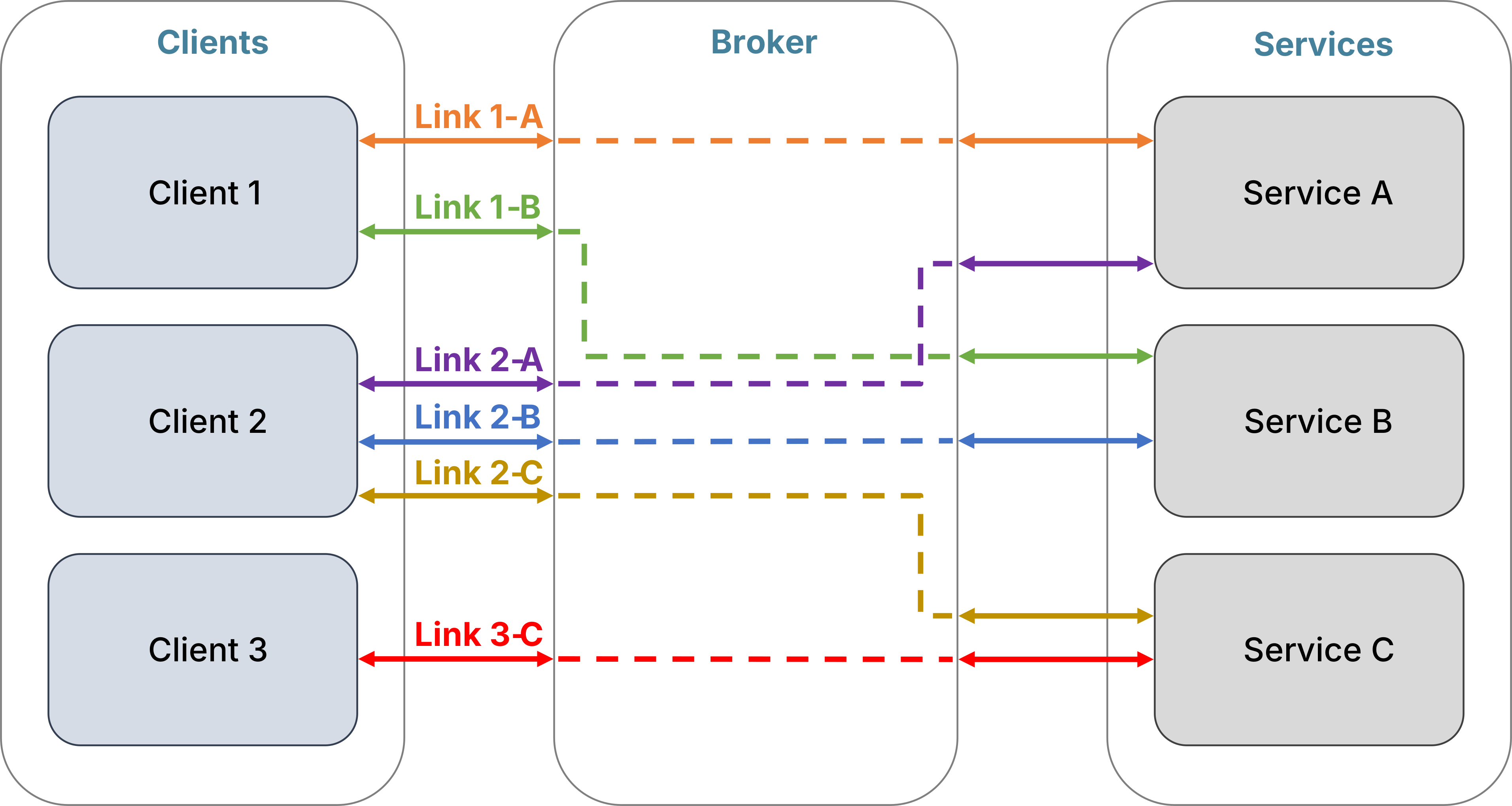
Messages are transferred using ZeroMQ sockets. As such, the order in which you run a Broker, Client or Service does not matter. A Service can connect to a Broker that has not started yet and when the Broker does start running it will register the Service as being available for Clients to interact with. When a Service disconnects, the Broker unregisters it. A Client can connect to a Broker that has not started yet and it can link with a Service that is not available yet, but it cannot get a reply from the Service until the Service is running to process the request.
Any programming language that has a ZeroMQ binding available can be used to implement a Client or a Service. So a Client written in Python could be requesting a Service written in C++ to process the request (or vice versa). See the languages directory in the repository for implementations of a Client and Service in different programming languages.
Broker¤
A Broker is the central node in the network and acts as a message proxy. Running a single Broker instance can support many Clients and Services connected to it simultaneously. The Broker routes a Client's request to the appropriate Service and sends the Service's reply back to the Client (ZeroMQ REQ-REP pattern). A Broker also distributes a message published by a Service to all Client's that are subscribed (ZeroMQ PUB-SUB pattern). A message is routed as soon as possible once it is received, a queue is not used. A Broker only checks who the recipient is for a message it receives, it does not do any processing with the content of the message.
There are a few runnable examples that are available when msl-network is installed. The Echo example illustrates the ZeroMQ REQ-REP pattern and the Heartbeat example illustrates the ZeroMQ PUB-SUB pattern.
Message Format¤
A message (a request, reply or publication) is transferred as bytes, but a Client and Service can control how data is serialised into bytes and whether compression is applied before the bytes are transferred. The serialisation and compression algorithms are controlled by the Flag enumeration value. When a Client or Service receives a message, the message is automatically decompressed and deserialised.
The default serialisation method uses the pickle format with no compression. When using the pickle format to deserialise data, it is important that you trust the Clients and Services that you are transferring messages between.
You can also temporarily change the flag value before sending a request (see here) or a reply (see here).
(A)synchronous Requests¤
A Client can send requests either asynchronously or synchronously (the default). When an asynchronous request is sent, a Future instance is returned which will eventually contain the reply to the request as the result. When a synchronous request is sent, the reply from the Service is returned.
Example
See the Echo example to start the Broker and start the Service so that you can run the following example script.
See here for more information about the sync keyword argument in the following example script.
from msl.network import Client

with Client() as client:
    # Create a Link with the Echo service
    link = client.link("Echo")

    # sync=True is the default keyword argument when sending a request
    print(link.echo(1))

    # or you could specify it explicitly
    print(link.echo(2, sync=True))

    # send asynchronous requests
    future1 = link.echo(3, sync=False)
    future2 = link.echo(4, sync=False)
    future3 = link.echo(5, sync=False)

    # do other stuff ...

    # get the reply of each request
    print(future1.result())
    print(future2.result())
    print(future3.result())
Service Load Balancing¤
While a Service is processing a request, it cannot receive another request. If a Service is continuously busy processing requests you can run multiple instances of the Service and the Broker will evenly distribute requests amongst the Services. You could run an instance of the Service multiple times on the same computer or you could run the Service on multiple computers.
Security¤
There are five options for controlling the security of a device connecting to a Broker. Since security is handled by ZeroMQ sockets, we use the same mnemonic names commonly used by the ZeroMQ community to illustrate the different ways you can use security in your application. You may also want to read some background information about the ZeroMQ Authentication Protocol. The following table illustrates which security features are supported in each option.
| Restrict IP addresses | Username/Password Authentication | CURVE Encryption | Broker Verified | Client/Service Verified | |
|---|---|---|---|---|---|
| Grasslands | ❌ | ❌ | ❌ | ❌ | ❌ |
| Strawhouse | ✅ | ❌ | ❌ | ❌ | ❌ |
| Woodhouse | ✅ | ✅ | ❌ | ❌ | ❌ |
| Stonehouse | ✅ | ❌ | ✅ | ✅ | ❌ |
| Ironhouse | ✅ | ❌ | ✅ | ✅ | ✅ |
Grasslands¤
No encryption. No security. This is the default mechanism.
Start a Broker using,
msl-network start
and use the default parameters for curve and plain when creating an instance of a Client/Service.
from msl.network import Client

client = Client()
Strawhouse¤
No encryption. The Broker allows connections from only specific devices, based on the hostname or IP address of the device. This security layer is known as the NULL mechanism.
On the computer that you want to run the Broker on, you can save the devices that are allowed to connect to the Broker in a file,
msl-network device add 192.168.1.10 lab-computer
and start a Broker with the devices read from the file.
msl-network start --auth-device
Alternatively, you can specify the devices directly when starting the Broker (which will not read the devices from the file).
msl-network start --auth-device 192.168.1.32
Use the default parameters for curve and plain when creating an instance of a Client/Service.
from msl.network import Client

client = Client()
See msl-network device for more details about managing authorised devices.
Woodhouse¤
No encryption. The Broker requires a valid username and password for a device to connect. In addition, a Broker may also allow connections from only specific devices (see Strawhouse). This security layer is known as the PLAIN mechanism.
Warning
A username and password is sent in plain text through the network. Use this security mechanism only on trusted networks.
On the computer running the Broker, add usernames and passwords of authorised users to a file
msl-network plain add --username me --password secret
msl-network plain add --username you --password danger
and start a Broker with the usernames and passwords read from the file.
msl-network start --auth-plain
Specify the plain parameter when creating an instance of a Client/Service.
from msl.network import AuthPlain, Client

# Either specify the values directly in your code
auth = AuthPlain(username="me", password="secret")

# Or you can load the values from a file
auth = AuthPlain.load("~/auth.txt")

client = Client(plain=auth)
See msl-network plain for more details about managing usernames and passwords and AuthPlain for loading PLAIN credentials.
Stonehouse¤
Messages are encrypted with elliptic-curve cryptography. A Client/Service verifies the public certificate of a Broker (one-way verification). In addition, a Broker may also allow connections from only specific devices (see Strawhouse). This security layer is known as the CURVE mechanism.
Create CURVE certificates on the computer running the Broker and also on the computer connecting as a Client/Service.
msl-network curve
Start a Broker with its CURVE certificate loaded.
msl-network start --auth-curve
Copy the Broker's public CURVE certificate to a computer connecting as a Client/Service and specify the curve parameter when creating an instance of a Client/Service.
from msl.network import AuthCurve, Client

# Load the public CURVE certificate of the Broker.
#
# The private certificate of the Client is automatically
# loaded from the file created by running `msl-network curve`
auth = AuthCurve.load("~/.curve/broker.key")

client = Client(curve=auth)
See msl-network curve for more details about creating CURVE certificates and AuthCurve for loading CURVE certificates.
Ironhouse¤
Messages are encrypted with elliptic-curve cryptography. The Broker verifies the public certificate of a Client/Service and a Client/Service verifies the public certificate of the Broker (two-way verification). In addition, a Broker may also allow connections from only specific devices (see Strawhouse). This security layer is (also) known as the CURVE mechanism.
Create CURVE certificates on the computer running the Broker and also on the computer connecting as a Client/Service.
msl-network curve
Copy a Client/Service's public CURVE certificate to the ~/.curve directory on the computer running the Broker and start a Broker with the certificates loaded.
msl-network start --auth-curve
Copy the Broker's public CURVE certificate to a computer connecting as a Client/Service and specify the curve parameter when creating an instance of a Client/Service.
from msl.network import AuthCurve, Client

# Load the public CURVE certificate of the Broker.
#
# The private certificate of the Client is automatically
# loaded from the file created by running `msl-network curve`
auth = AuthCurve.load("~/.curve/broker.key")

client = Client(curve=auth)
See msl-network curve for more details about creating CURVE certificates and AuthCurve for loading CURVE certificates.